


Why dotSource is Your Magnolia CMS Agency
- Over 40 Magnolia projects in more than 15 sectors
From industry and retail to public-sector clients: requirements rarely repeat themselves, but patterns do. You benefit from project experience that does not have to be developed from scratch the first time around, as well as from a realistic assessment. Companies such as Villeroy & Boch or Pöppelmann already trust in our implementation expertise in demanding environments.
- Holistic digital solutions from a single source
Whether CMS, e-commerce, CRM, marketing automation, UX or AI, we combine in-depth technical expertise with industry understanding and deliver integrated platform solutions that scale. - Benefit from more than 20 years of expertise
Since 2006, we have been supporting companies through digital transformation with sound expertise. From strategy to continuous optimisation.

- Opt for excellent CMS solutions for the highest demands
As a certified Magnolia partner, we implement high-performance, award-winning content management platforms for complex requirements in B2B and B2C.
Optimise Your Digital Experiences with Magnolia and Our Team’s Process
1. Analysis & strategy development

Your project sets the direction. Together, we define how you will measure success with Magnolia and which systems and markets are affected. You will receive a target vision with key figures and a prioritised roadmap.
2. Concept & architecture design

Benefit from a blueprint that is technically flawless and simultaneously makes your team’s everyday working life easier. You will receive an architecture document with a component catalogue.
3. Pilot phase

A genuine excerpt instead of a presentation. You can see how Magnolia works together with your systems before larger budgets are committed. You work with a live proof as a basis for decision-making.
4. Implementation & migration

Rely on a platform that is connected to your relevant systems and therefore delivers a seamless experience. You work directly with migrated content and an editorial team that is already fully onboarded.
5. Go-live & continuous development

With dotSource, you benefit from a clearly structured go-live and leave nothing to chance. You receive a stable system and recurring analyses for management purposes.
Free Magnolia Consultation: Your First Step to a Successful Magnolia Project
Would you like to learn more? I look forward to hearing from you.

Our team will get back to you as quickly as possible!
As a rule, you will receive an initial response within 24 hours.
These Companies Already Rely on Magnolia CMS with dotSource




Get Inspired by Our Other Magnolia Projects

Content commerce at its best
Find out how Villeroy & Boch boosted the performance of its online shops and sustainably improved customer loyalty through the introduction of Magnolia by dotSource.

Future-proof global website
Read how Pöppelmann optimised its international content strategy with dotSource by introducing Magnolia as a cloud-based solution.

Seamless B2B customer journey
Discover how Angst+Pfister built a scalable B2B platform with Magnolia and dotSource. With seamlessly integrated systems and a compelling customer journey
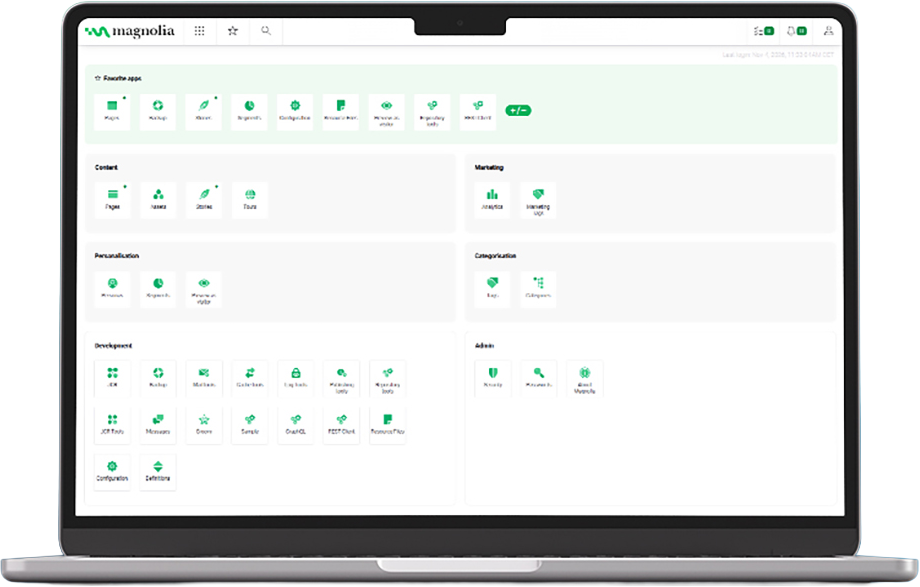
App overview in the Magnolia backend in the streamlined view for four roles. The actual range of functions depends on the assigned permissions.
A system that assigns the right workspace to every role
Editorial, marketing, development and administration work in separate areas in Magnolia. Each role is given the functions it needs for its tasks and sees only the content it is authorised to access. This shortens onboarding and rules out incorrect entries outside one’s own area of responsibility.
What the areas deliver in day-to-day work:
- Editorial: Maintain content and edit it directly in the preview without requesting development capacity.
- Marketing: Create campaigns and A/B tests without initiating a development request.
- Development: Make version-controlled changes to templates and configurations, separate from live operations.
- Administration: Manage access rights centrally instead of distributing them across individual systems.
What is Magnolia CMS?
With Magnolia CMS, you manage your content centrally in one place and publish it across all channels. Like other content management systems, Magnolia offers your editorial team and marketing teams an interface they can use without any programming knowledge.
Magnolia acts as a headless system. Content is stored in a structured way and delivered via interfaces to any frontend. Your editorial team can visually adjust the live page using drag and drop, while your development teams are free to build new elements.
You can tailor your platform with Magnolia entirely to your needs: from a CMS to a Composable DXP. Personalisation, multilingualism with AI-powered translation and integrations with systems such as PIM or CRM are not separate projects, but expansion stages of the same platform. This allows the solution to grow with your requirements while preserving your investment.
Magnolia CMS Key Features That Help You Move Faster
Headless
Content is stored in a structured way and delivered to every front end via open APIs.
Visual editing
Content teams create live applications via drag-and-drop in the editor instead of waiting for deployments.
Personalisation
Content can be delivered for each module and target group without the editorial team having to create separate pages.
Multilingual content with AI translation
International rollouts run via integrated translation pipelines with mandatory human approval before publication.
Composable architecture
DAM systems, Commerce engines and data sources are brought together in a single editorial interface, without vendor lock-in.
Editing without developers
Modular components and declarative dialogues make new page elements available quickly, so that changes do not end up in the IT queue.
You May Also Be Interested in Our Other CMS Services



Frequently Asked Questions About Magnolia CMS
01
How much does Magnolia cost and which cost blocks will we need to budget for?
The actual costs depend on the number of sites, languages, instances and the selected support level. In addition, there are four separate blocks: implementation, integrations, operation and training. A reliable figure can only be determined after the requirements analysis.
02
Is the Community Edition enough, or do we need Enterprise?
The Community Edition is free of charge under GPLv3, does not require a licence key and is limited to a single receiver; it has fewer functions than DX Core and no vendor support. It is suitable for prototypes, tests and small-scale projects. As soon as personalisation, multiple instances, cloud operation or SLA support are required, the route leads to the Enterprise version. Switching is straightforward because both run on the same foundation. Templates, configurations and content are largely retained.
Put simply: the free version is a fully fledged test system. You can use it to try everything out and even run a small website — but there is nobody at the vendor you can call if something goes wrong, and it can only deliver content to a single delivery environment. That is enough for a prototype or a test site. As soon as multiple brands, countries or channels are to be served from one installation, or operations need to run reliably, you need the Enterprise version.
How to tell: if you use Magnolia purely for testing things out, the free version is the right choice. If you want to work with it in practice, meaning you are taking responsibility for content and availability, the Enterprise version is the more realistic choice.
Moving over is not a fresh start. Both versions are the same system with different feature sets — what you built during testing will continue to run after the switch.
03
How does a migration work, and how does it affect our visibility?
The process is less a relocation than a rebuild with carry-over: components are reviewed and sorted into “retain”, “merge” or “remove”, followed by content mapping and import into the new model. Three things are crucial for visibility: a complete URL and redirect concept, correct hreflang assignments, and monitoring that actively tracks rankings and 404 errors in the first few weeks. Those who plan for these three points as part of the project generally do not lose any significant visibility.
04
How many of our own resources do we need to allocate to the project?
You reliably need three roles: an authorised project lead on your side, an editorial representative with approval authority, and a technical contact for operations, security and network matters. The time required does not decrease with the number of people involved, but with the clarity of the decision-making paths.
05
How does the connection to other commerce systems or marketing automation actually work?
Three questions determine the effort involved:
Which system is the leading system for the data? Is the single source of truth for product data in the PIM or in Magnolia?
Is the data queried live or synchronised in batches?
And what happens if the third-party system does not respond?
These three decisions determine whether the connection remains maintainable in the long term. In doing so, they also determine whether the overall construct holds up, not just the integration.
06
How quickly does the editorial team become productive?
After the training, your team can create and publish content. What takes time is clarifying responsibilities: who reviews, who approves, who decides in the event of conflicts. These questions only arise during actual publishing. Experience shows that teams that define an approval workflow before go-live and appoint two power users work independently from day one.