

Productivity, Integration and Control in One Solution
Personal AI assistants mark the next step beyond traditional chatbots: Rather than simply answering questions, they actively work alongside users – whether in development, operations or knowledge work.
Many companies recognise the potential of agent-based assistance. In practice, however, they quickly run into issues regarding transparency, control, security and integration.
This is exactly where the dotSource Personal Assistant comes in – a secure assistance solution that helps with real-world tasks across the systems you already rely on.
The dotSource Personal Assistant runs in Microsoft Teams and integrates seamlessly with a wide range of tools, including the following:
- Microsoft 365
- Customer relationship management (CRM), content management and product information management systems
- Jira and Confluence environments
With the dotSource Personal Assistant, you lay the foundation for bringing agent-based support into a secure business context:
- Clear access rules
- Isolated instances
- Transparency regarding LLM costs
- Robust compliance architecture
Use Cases: How the dotSource Personal Assistant Supports Your Everyday Work
- Identifies outdated, duplicate and oversized files in OneDrive, SharePoint and other shared drives
- Supports clean-up and structuring in team workspaces
- Scans your inbox at defined intervals and detects urgent messages
- Automatically flags e-mails requiring action and makes priorities easier to spot
- Processes content from URLs, YouTube, PDF files, Word documents and SharePoint pages
- Turns it into summaries, blog articles, LinkedIn posts and e-mail drafts
- Reads live data from Excel, Salesforce, Jira and enterprise resource planning systems
- Connects multiple sources for dynamic reporting
- Handles research on external websites (e.g. for price comparisons or competition analyses)
- Securely completes forms via the server
- Creates scripts for data analyses, Excel transformations and application programming interface (API) calls
- Executes defined tasks in a controlled sandbox
- Saves recurring workflows as skills and makes them available at any time
- Assists with tasks such as quote templates, meeting minutes and CRM updates via Teams message
- Helps with the preparation, follow-up and structuring of meetings
- Reviews calendar entries, consolidates relevant information and assists with minutes and to-dos
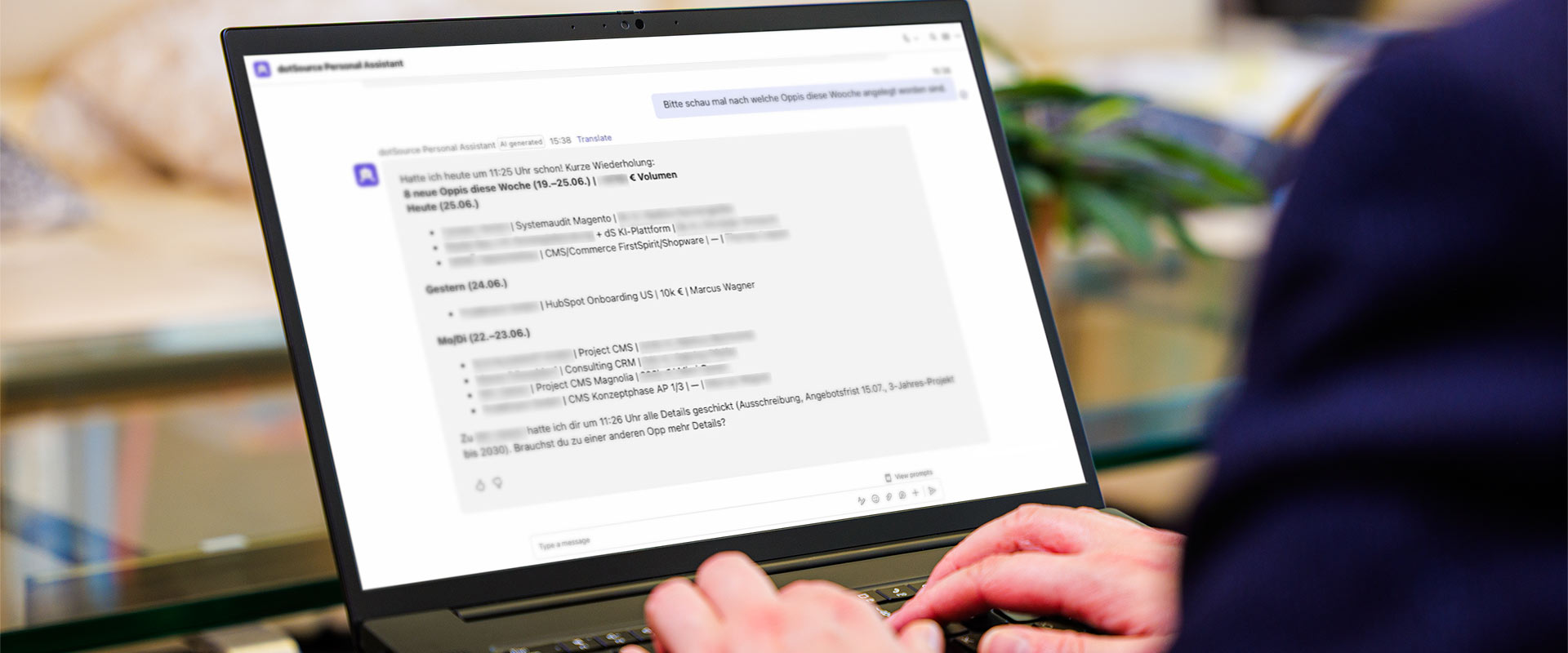
How the dotSource Personal Assistant Integrates into Your System Landscape
Microsoft Teams as Your Workspace
The dotSource Personal Assistant supports employees directly in Microsoft Teams and fits into existing workflows.
- Start tasks directly in your familiar working environment
- Receive support in chats, channels and around meetings
- Eliminate unnecessary switching between different tools
MCP Integration into Your System Landscape
The dotSource Personal Assistant connects systems such as Jira, Confluence, Salesforce, Microsoft 365 and other applications in a controlled way.
- Consolidate information across your existing systems
- Define read and write access through isolated MCP connections
- Fit into existing processes
Model Selection for Every Use Case
Depending on the requirements, the dotSource Personal Assistant uses local or more powerful external models.
- Handle simple tasks efficiently using suitable models
- Work on complex analyses by bringing in stronger models
- Combine productivity, cost control and digital sovereignty
We Support You in Implementing the dotSource Personal Assistant
1. Discovery and Assessment
Together with you, we assess which tasks the dotSource Personal Assistant is suitable for and how the solution can be meaningfully integrated into your system landscape.
- Evaluation of potential scenarios
- Alignment with your data and IT strategy
- Identification of initial use cases and quick wins
2. Concept Creation
Based on your goals, we develop a blueprint for embedding the dotSource Personal Assistant into your business – from integrations, roles and governance to the operating model.
- Strategic vision and understanding of roles
- Integrations, access rights and responsibilities
- Coordination regarding IT, security, data protection and business units
3. Pilot Phase and Enablement
With a clearly defined scope, a small user group and targeted communication, we implement a pilot project together.
- Selection of a pilot team and suitable use cases
- Support with set-up, integration, testing and evaluation
- Training of IT and other departments
dotSource Personal Assistant: Plans and Prices
Starter
Package
- Features: Chat, OCR, memory system, scheduler, workflow development, updates
- Support: x
- Large Language Models: 2 LLMs
- MCP Integration: 1 MCP server (Microsoft 365)
- Assistants: 4
- Operations: ✓
- Kick-off Workshop and Enablement Session: Optional
- Design and Implementation of Use Cases: Optional
Onboarding
- €1,500 per month (plus approx. €500 in LLM token costs)
- €15,000 one-off set-up costs
- Minimum term of 6 months
Basic
Package
- Features: Chat, OCR, memory system, scheduler, workflow development, updates
- Support: ✓ (8 hours per month)
- Large Language Models: 3 LLMs
- MCP Integration: 2 MCP servers
- Assistants: 10
- Operations: ✓
- Kick-off Workshop and Enablement Session: Optional
- Design and Implementation of Use Cases: Optional
Onboarding
- €4,000 per month (plus approx. €1,000 in LLM token costs)
- €30,000 one-off set-up costs
- Minimum term of 12 months
Business
Package
- Features: Chat, OCR, memory system, scheduler, workflow development, updates
- Support: ✓ (16 hours per month)
- Large Language Models: 5 LLMs
- MCP Integration: 4 MCP servers
- Assistants: 30
- Operations: ✓
- Kick-off Workshop and Enablement Session: ✓
- Design and Implementation of Use Cases: 3 use cases
Onboarding
- €6,000 per month (plus approx. €2,000 in LLM token costs)
- €60,000 one-off set-up costs
- Minimum term of 24 months
Meet the dotSource Personal Assistant
Your Contact for Further Questions

You Will Hear from Us Soon
- Our AI experts will take your enquiry and get back to you within one working day.
Other AI Services at a Glance



FAQ – Frequently Asked Questions About the dotSource Personal Assistant
What is the dotSource Personal Assistant?
The dotSource Personal Assistant is a secure assistance solution for Microsoft Teams that helps with specific tasks across your existing systems. It combines productive everyday support with controlled integration, defined access rights and a focus on governance.
What sets the dotSource Personal Assistant apart from conventional chatbots?
Unlike isolated chatbots, the dotSource Personal Assistant acts as a truly autonomous AI agent. It carries out specific, cross-system tasks in the background, e.g. managing CRM data, structuring calendars or creating tickets. In addition, this in-house development is based on clear access rules, isolated instances, audit trails and a well-thought-out compliance framework, particularly relevant in view of the EU AI Act.
Does the dotSource Personal Assistant ensure data security and compliance (e.g. GDPR)?
The dotSource Personal Assistant is based on an open source architecture (OpenClaw) and uses a dedicated governance layer. Individual instances are strictly isolated from one another – and it is precisely defined which accounts, e-mails and APIs the dotSource Personal Assistant is permitted to access. Real passwords (secrets) are only injected in encrypted form when a request is made.
Which systems does the dotSource Personal Assistant work with?
The solution integrates seamlessly with Microsoft Teams, OneDrive, SharePoint, Jira, Confluence, Salesforce and other applications. Existing system landscapes can be connected in a controlled way via MCP.
Do we need a Microsoft Copilot subscription to use it?
No, a Microsoft Copilot subscription is not required for the Teams version of the dotSource Personal Assistant.
What does MCP integration mean in practice?
Via MCP, systems such as Jira, Confluence, Salesforce and Microsoft 365 can be integrated in a standardised way. This enables the dotSource Personal Assistant to read information across systems and – within defined boundaries – process it further in connected applications.